The science behind our TV size and distance calculator
Bigger and closer is usually better when it comes to choosing the perfect television for your room. Not only is it the biggest factor affecting the price of a television, but it also has a huge impact on the perceived picture quality.
ANGULAR RESOLUTION
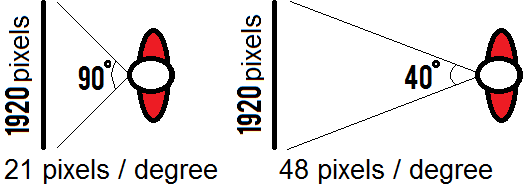
Angular resolution of a television
The closer you are, the lower your perceived pixel density will be
If you sit too close, though, you will notice the pixels of the television, even if you are watching a 1080p HD movie. By increasing your distance from the TV, the density of the details will also increase, producing a better image. This is the angular resolution: the number of pixels per angle. The farther away, the higher the angular resolution will be.
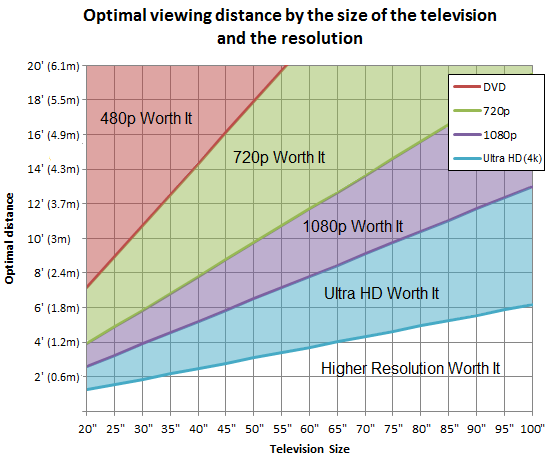
Optimal viewing distance of a television by its size, for DVD, 720p, 1080p and Ultra HD (previously known as 4K) resolutions.
The chart also shows that 4K Ultra HD resolution is not worth it if you are sitting more than 6' away and have a 50" TV. Your eye won't be able to tell the difference. Ultra HD only makes sense if you want a really big screen and plan on sitting close to it. Learn more about 4k UHD.
Screen Size Optimal Distance
1080p
25" 3.3' (1 m)
30" 4' (1.22 m)
35" 4.6' (1.40 m)
40" 5.3' (1.62 m)
45" 6' (1.83 m)
50" 6.6' (2.01 m)
55" 7.3' (2.23 m)
60" 8' (2.44 m)
65" 8.6' (2.62 m)
70" 9.3' (2.83 m)
The limit to which you can increase the angular resolution by stepping back depends on your visual acuity. At some point, your eyes are not good enough to distinguish all the details. Studies show that someone with 20/20 vision (or 6/6 in Europe) can distinguish something 1/60 of a degree apart. This means 60 pixels per degree, or 32.86 degrees for a 1080p television. Keep in mind that you can see a single pixel from farther away (depending on its contrast with the rest of the picture).
If you want to learn more about where that limit of 1/60 of a degree comes from, you can read the Wikipedia page on visual acuity.
Using this data, the closest you can sit to your television while still maintaining the maximum perceived angular resolution is about 1.6 times the diagonal measurement of your television. For example, a 55" television will have an ideal viewing distance of 88" (55" x 1.6), or 7 feet and 4 inches. The following table gives you the minimum distance for watching a 1080p HDTV screen while keeping the angular resolution to the maximum that the human eye can perceive. The chart shows the optimal distance for the DVD (NTSC 720x480 or PAL 720x576), 720p, 1080p and Ultra HD (previously known as 4K) resolutions. Only the horizontal resolution is considered, which is why both NTSC and PAL DVD resolutions are on the same line.
How do you interpret the chart?
There are a few ways to read the chart. For example, let say that you have a 50" television. Start at the bottom of the chart at 50". Up to 3', you are below the blue line. This means you can see the pixels of an Ultra HD resolution. If you go back a bit (up in the chart), between 3' and 7', an Ultra HD resolution does not matter anymore because you cannot see the extra pixels anyway. However, you are still too close for a 1080p resolution (it will not appear perfect). Above 7', the perceived quality will start to decrease for 1080p because your eye will not see all the details. You would notice the difference though, it if was 720p. For more than 10', it does not matter if it is a 720p or 1080p HDTV, your eye is not good enough to see the difference. You will still see the difference for a standard resolution video, though, up to a distance of 18'. To summarize, you can see the pixels if you are below the line, but not when you are above.
Ideally, you want to be exactly on the line for your TV size and media resolution.
Example of artifacts for the same resolution depending on the compression
Compression Artifacts
This takes into account perfect resolution, which is never the case in real life. Even if you are watching an HD channel presented in high resolution, there will be some artifacts due to the compression algorithm. Artifacts can appear in multiple forms like noise, blurs or a pixelated image (see the picture to the right). You will be able to see artifacts from farther away, so consider the above numbers as being for perfect 1080p media. The numbers show the minimum distance at which you start losing the advantage of the resolution.
Fonte:
http://www.rtings.com/tv/learn/size-to-distance-relationship


 ][
][ ]
]